
Management – Adding and Editing Business Units
Business units are used to divide the platform into manageable sections for our users.
Business units can be created at the macro level (ex. all factory devices) as well as the micro level (devices on conveyor line A).
Please review the hierarchy slide for more detailed information on managing Business Units.
Management – Business Units
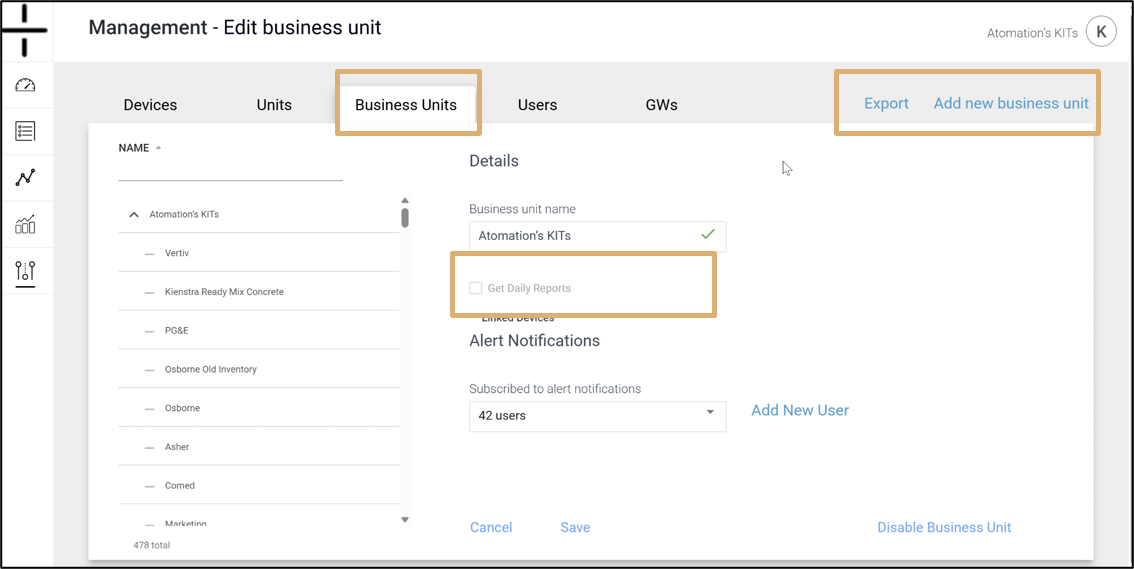
Business units are a simple way to separate your Atom program management into smaller sections of Atoms, making the overall project simpler to manage.
- Business units can be created at the macro level (ex. all factory devices) as well as the micro level (devices on conveyor line A). Business units can be created for locations, particular areas of a manufacturing facility, a utility line – the choices are up to the user.
- Business units can be created at any time.
- Atoms can be shifted from one unit to another as needed.
Please review the hierarchy image for more detailed information on managing Business Units. To create a new business unit, click on the Add new business unit link.
Add the unit name and select an Admin user. Then select the Parent unit.
Add the users that should receive alert notifications for this business unit if applicable.
If you would like for reports to be sent for this business unit, click the Get Daily Reports checkbox.
NOTE: Business Units CANNOT be deleted once created. Please consider carefully which teams and team members should be added and then create the necessary units to support them.
Users can, however, move devices between Business Units and change associated users and devices within and across Business Units as needed.