
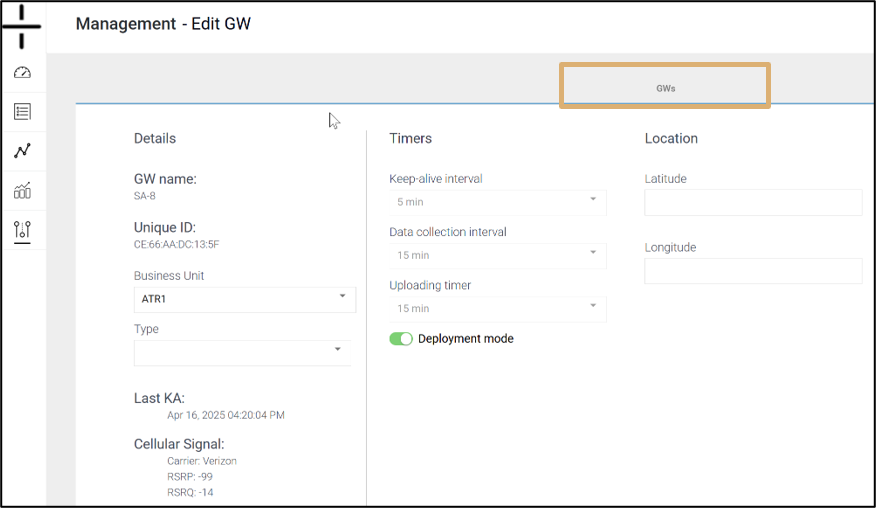
Click on the Gateway name on the Gateway management screen to access the Edit Gateway section of the dashboard. This screen is composed of three columns containing the details, timers and location for the Gateway.
- Column 1: Details
-
- GW Name: this is the name the user creates for the Gateway
- Unique ID: this is the MAC ID of the Gateway and is not editable
- Business Unit: dropdown option to select an optional Business Unit
- Type: this is not an editable field and shows whether the device is a Gateway or an AT-U (stand-alone unit)
- Last KA: the last time the device connected with the cloud. Keep alive interval is determined by the timer setting “Keep-alive interval”
-
 Cellular Signal:
Name of Carrier
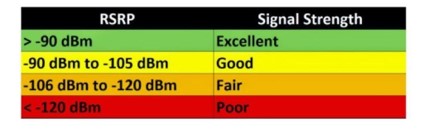
RSRP: Reference Signal Received Power. It’s a measurement used in 4G LTE and 5G networks to indicate the signal strength received from a specific cell tower. RSRP is measured in dBm (decibel-milliwatts) and a higher RSRP value generally indicates a stronger signal.
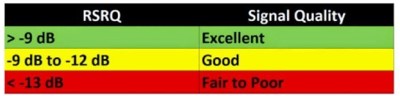 RSRQ: Reference Signal Received Quality) measures the quality of the received signal from the base station (cell tower). It assesses the signal’s strength while also considering interference and noise. RSRQ is typically measured in decibels (dB) and ranges from -3 dB (low interference) to -18 dB (high interference).
- GW model and version:
- these are internal to Atomation and can be used when troubleshooting
- Column 2: Timers – these settings may be pre-programmed when a new Gateway is added to your account
- Keep alive interval – choose either 12 or 24 hours
- Data collection interval – users have the option to choose how frequently data should be collected from linked devices
- Uploading timer – this determines how frequently data is uploaded from the Gateway to the cloud. Selecting 1 hour will reduce the battery life of the Gateway.
- Deployment mode: This mode is for the first installation at the site. This mode allows users to increase the number of uploads and KAs to get a final score for cellular communication and BLE communication for the Atoms and Gateways. This gives the installer the ability to ensure connectivity and proper set up for devices before finalizing the installation. Deployment mode is set for 3 hours and then returns to the default configuration.
- Column 3: Location
- Latitude and Longitude are auto-populated if the Gateway or Stand-alone unit was able to secure GPS location. More information regarding GPS location is available on this page of the Dashboard manual.