
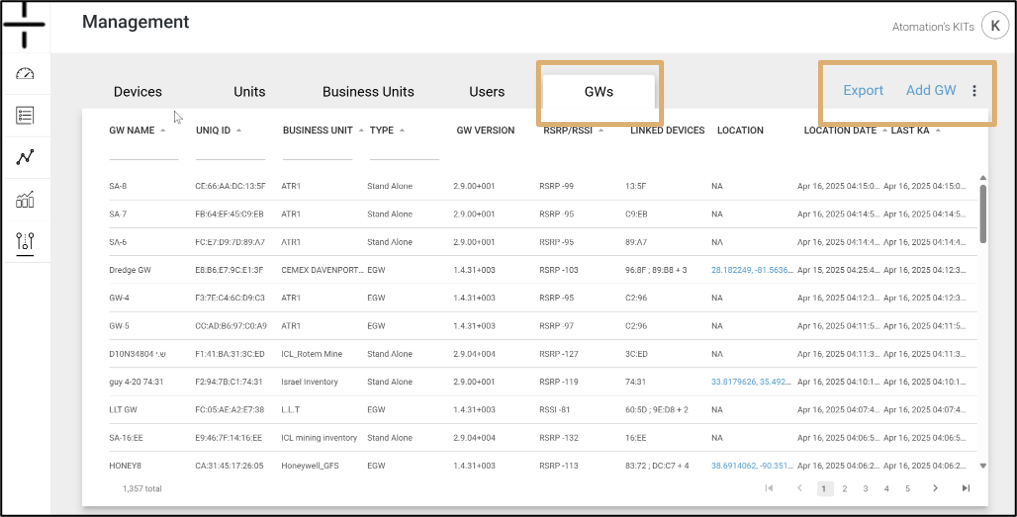
The Gateway tab lists all Gateways by name in the account along with the following information:.
- GW Name: Gateway name selected by the user
- UNIQ ID: the MAC ID (unique identifier) for the Gateway
- Business Unit: Associated Business Unit for that Gateway
- Type: Whether the Atom is a Gateway or a Stand-alone device
- GW Version: used solely by Atomation, this field denotes the software version on the device
- Linked Devices: Devices linked to the Gateway are listed here
- Location: GPS location, if known, is displayed here. This is a clickable link that opens a new window in Google maps. GPS location shows two digits past the decimal point and is a less precise location than the full GPS coordinates provided on the Gateway DETAILS screen. When mapping or locating Atoms, use the full GPS coordinates provided on the Device or Unit screens for the best accuracy.
- Last KA: this stands for Last Keep Alive and is the last date the Gateway connected to the cloud. Keep alive signals are typically received every 12 or 24 hours, depending on Gateway setup.
Users can filter and sort using the carets and fields below each column name.
Use the Export option to export a list of all Gateways in the account.
Click Add new GW if you are adding a new Gateway to your account.
Clicking on the Gateway Name takes you to edit mode for this Gateway.